ABOUT
About Brayer, the online mockup studio.
Brayer is an online mockup studio that puts your screenshots and artwork on devices, print and 3D products, right in the browser.
Updated
Who makes it
Brayer is made by Álex Coca, a solo founder in Córdoba, Spain. He designs, builds and supports it, and launched it at usebrayer.com on 21 September 2026. He also writes the guides and comparisons on this site.
Where the name comes from
A brayer is the hand roller printmakers use to lay an even film of ink across a plate before a print is pulled. It is the tool the finish comes from, which is what this studio sets out to be for a screenshot. Say it BRAY-er.
So if you were looking for the printmaking roller itself, this isn’t it: Brayer is software for making mockups, and it doesn’t sell art supplies.
How it works
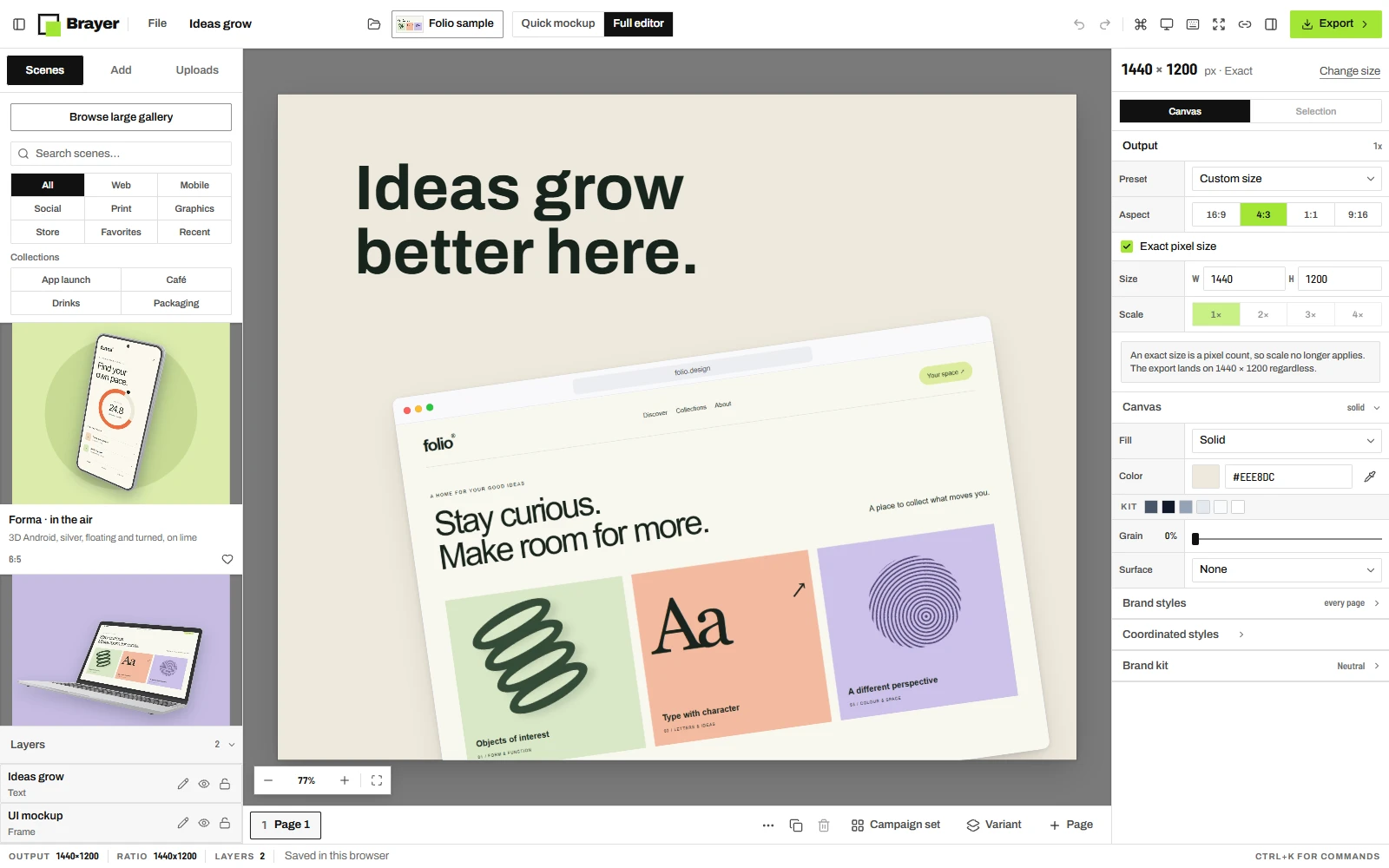
Brayer runs in your browser. You paste or drop in a screenshot or artwork, pick a scene, and it renders the mockup on your own computer: your images are edited and exported there and saved in that browser, and nothing is uploaded to make a mockup or export it. Cloud sync, on Pro, uploads designs only when you turn it on. Connect AI, when you turn it on, passes previews to the AI app you connected.
The studio needs no account. Free exports PNG and JPEG up to 3,000 px on the long side with no watermark. Pro costs €9 a month, €79 a year or €12 for a 30-day pass, and adds larger exports, WebP, transparency, batches, MP4 and WebM video downloads, the premium collections and optional cloud sync. Free and Pro, side by side.
Make still images or animate a design with presets, including a screen scroll through a tall screenshot, and editable keyframes. Motion editing and previews are Free; Pro downloads 1–30 second MP4 or WebM videos at 720p or 1080p and 24 or 30 fps, with no audio, and App Store app previews at Apple’s exact sizes. Its mockups are devices in 2D and 3D, print and stationery, and four 3D products: a takeaway cup, a coffee bag, a drinks can and a carton. There are no clothing mockups.
How it’s built
Brayer is a Next.js and React web app. The 3D devices and products are drawn with three.js, through your browser’s WebGL. The site is hosted on Vercel, which also counts page views without cookies. Accounts, Pro plans and optional cloud sync run on Supabase in the EU (Ireland), and payments go through Stripe.
Connect AI is a remote MCP server at usebrayer.com/mcp, published in the official MCP Registry as com.usebrayer/brayer, so Claude, ChatGPT and other MCP apps can design in an open studio tab.
How the comparisons are written
Brayer is one of the tools in its own comparisons, so they are dated, sourced from each tool’s public pages and free of ratings or “better than” verdicts. The full rules.
Contact
Questions, bugs, corrections and ideas all go to support@usebrayer.com, which Álex Coca reads himself. The operator’s legal details are in the terms and the privacy policy.
Brayer elsewhere: